



Pełny widok
Podobne przedmioty
Kamery YI 2K 3MP, zestaw 2/4 szt., system ochrony IP HomeKit z noktowizorem do biura/monitora dla dziecka/niani/zwierząt, Wi-Fi
116,52zł
Rozmiar czujnika : 2 sztuk

Ilość :

Raport
Uwzględnij naruszenie praw autorskichDarmowa standardowa wysyłka. Patrz szczegóły
Szacunkowo między Sat, Jul 18 a Wed, Jul 22
Możesz zwrócić produkt w ciągu 30 dni od daty otrzymania. Patrz szczegóły
Kupuj z ufnością

Gwarancja zwrotu pieniędzy
Odbierz zamówiony przedmiot albo zwróć pieniądze. Dowiedz się więcej
O tym przedmiocie
Źródło: 3C electronics mall
Sprzedawca bierze na siebie wszelką odpowiedzialność za tę ofertę.Numer przedmiotu: 37772654
Szczegóły pozycji
Stan
Nowy
Opis przedmiotu od sprzedawcy
YI Pro 2K Home Security Camera: 2K&3MP Quality. Capture More Details
View every event in 2K super clear image quality so you see exactly what is happening inside your home. Upgraded 3 million pixels, up to 2304 x 1296 resolution, for clarity in every angle.
Smart AI Detection
YI cloud storage comes with the latest in Smart AI capabilities which can distinguish Person, Vehicle, or Animal accurately and reduce false alarms significantly (Subscription Needed)
Enhanced Night Vision
Equips with 940-nm infrared lights, a high-sensitivity image sensor and F1.9 large aperture lens, YI 2K home camera captures detailed images even in low-light conditions.
Local SD Card and Cloud Storage
Store your data and recordings locally with an extra SD card (not included) or in the cloud. YI Cloud offers loop-recording with no storage limit, so even if your camera is stolen or damaged, your footage will still be secure and accessible on the cloud.
Compatible With Alexa and Google Assistant
Use your voice command to turn on YI camera for home security or view your camera live stream on Echo Show or any screen-based Alexa device or Google Chrome Cast.
Large Field of View
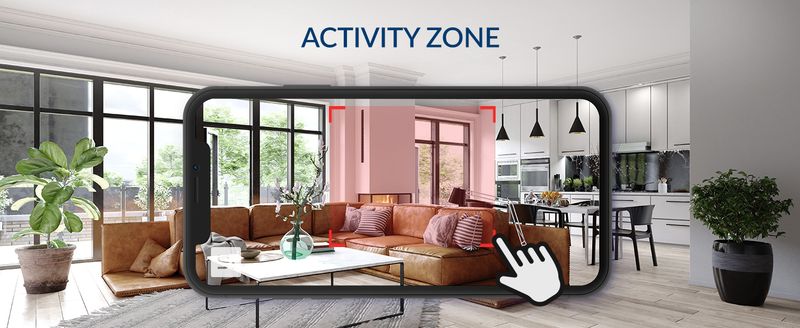
Activity Zone
Only receive alerts when motion detected in the set zone.
Home and Away Modes
A setting to control phone push notifications turn and off, no disturb when you are home.
Setting Up Your Camera With YI Home App
1.Install YI Home App and create a YI Home Account
2.Power your camera on and click the icon on the upper right corner in YI HOME app to add your camera
3.Select your Wi-Fi network and enter your Wi-Fi password, then select Connect to Wi-Fi
4.Scan the QR Code shown on the app, then select Next once the QR Code has scanned
5.Select Save, then select Start using to finish pairing
6.If connection failed, please push the Reset button and try again







Filmy
Filmy dla tego produktu

